To help us troubleshoot and resolve your issue as quickly as possible, our support team may need temporary administrator access to your WordPress site. Please follow these steps to create a secure, temporary admin account:
Step 1: Log in to your WordPress dashboard.
Step 2: In the left-hand sidebar menu, navigate to Users and click on Add New.
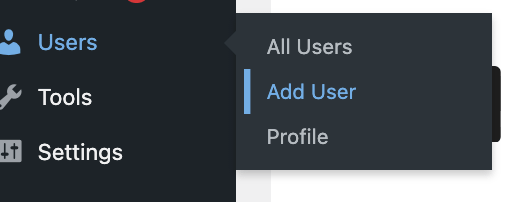
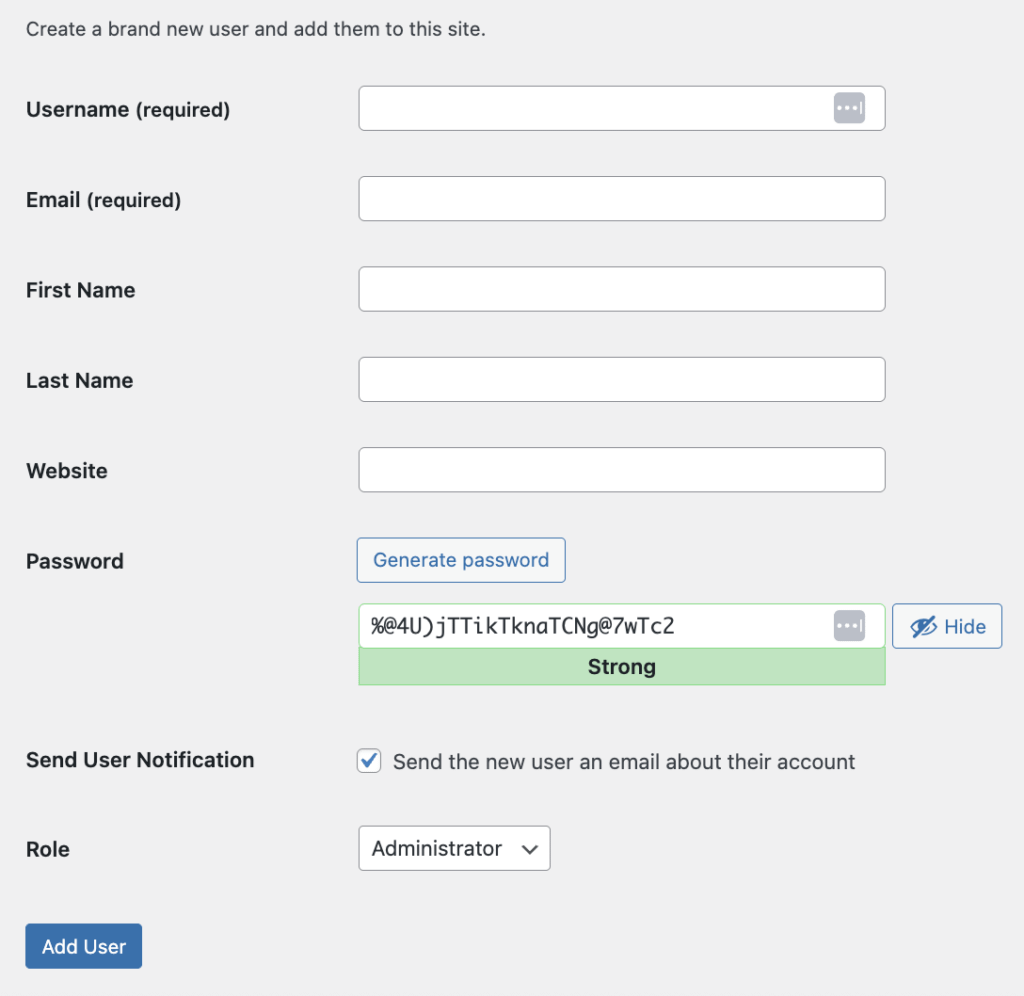
Step 3: Fill out the account details:
- Username: Enter a clear username (e.g.,
ThriveSupport). - Email: Enter a placeholder email (or the specific email requested by your support agent).
Step 4: Click the Generate Password button to create a secure password. Please copy this password.
Step 5: Important: Click the Role dropdown menu and select Administrator. Our team requires full Administrator access to investigate theme and plugin configurations.
Step 6: Click the Add New User button at the bottom.
Step 7: Add the Login URL, Username, and Password in https://secrets.supportally.com/. Generate the link and copy.
Step 8: Reply to your open support ticket and provide the generated secrets link.
Security Note: Once your support ticket is completely resolved, we recommend returning to the Users menu to delete this temporary account to maintain your site’s security.